

Skip to content
Crossley Media Group
  • Home
  • Services
    • Access Control System Installation
    • Alarm System Installation & Monitoring
    • Business Phones
    • IT Support
      • Computer Network Design and Management
      • Cybersecurity
      • Microsoft Cloud Solution Provider (CSP)
    • Security Camera Installation
    • Structured Cabling
  • Contact Us
  • Docs/FAQs
570-215-8501Call or Text
Crossley Media Group
  • Home
  • Services
    • Access Control System Installation
    • Alarm System Installation & Monitoring
    • Business Phones
    • IT Support
      • Computer Network Design and Management
      • Cybersecurity
      • Microsoft Cloud Solution Provider (CSP)
    • Security Camera Installation
    • Structured Cabling
  • Contact Us
  • Docs/FAQs
570-215-8501Call or Text
Crossley Media Group

Access Control/Security

  • Install & Configure Wisenet Mobile
  • Add Unifi Protect/Access App Permissions
  • Deactivate Unifi Access User
  • Troubleshooting Security Cameras
  • Enroll Unifi Access Card

Information

  • What is NDAA Compliance?

VoIP/PBX

  • ClearlyIP Softphone – Clearly Anywhere Setup
  • Yealink W73H Phone Cheat Sheet
View Categories
  • Docs
  • VoIP/PBX
  • ClearlyIP Softphone – Clearly Anywhere Setup

ClearlyIP Softphone – Clearly Anywhere Setup

1 min read

This article will walk you through download and setup of the Clearly Anywhere app. With this, you can make and receive calls and SMS from your Crossley Media Phone System.

Download the Clearly Anywhere app: #

  • Android
  • iOS

Android Battery Settings #

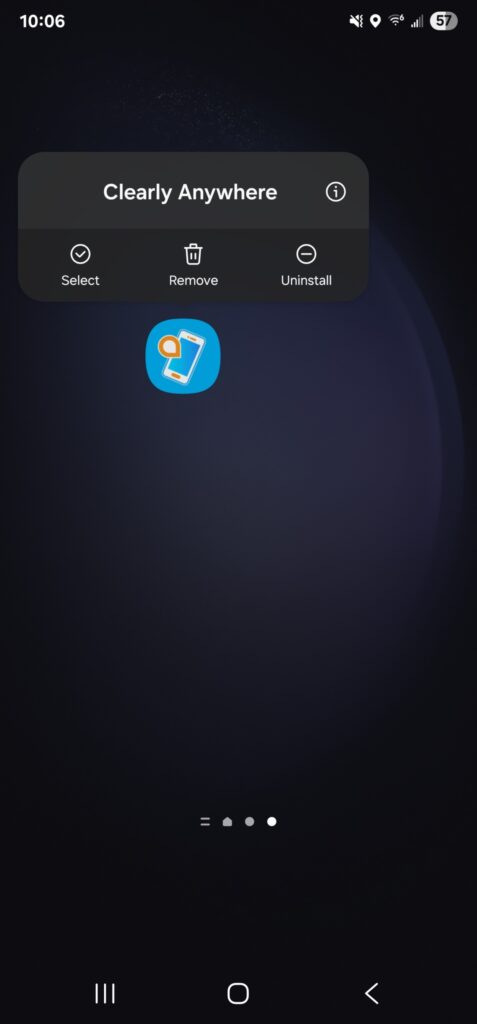
While the app will work without doing this, this process will ensure that the Clearly Anywhere app is set to not goto sleep. Hold the app and tap the information “i” button.
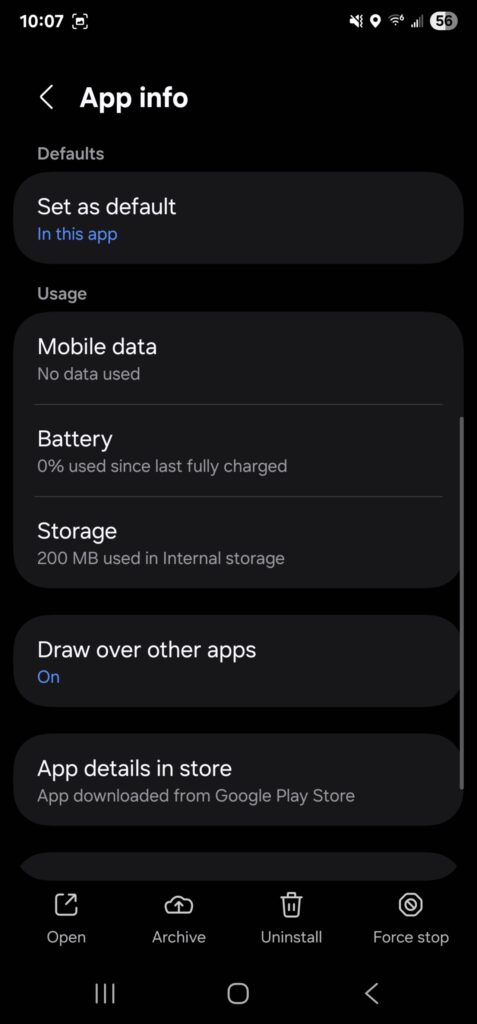
Next, Scroll down and tap “Battery”
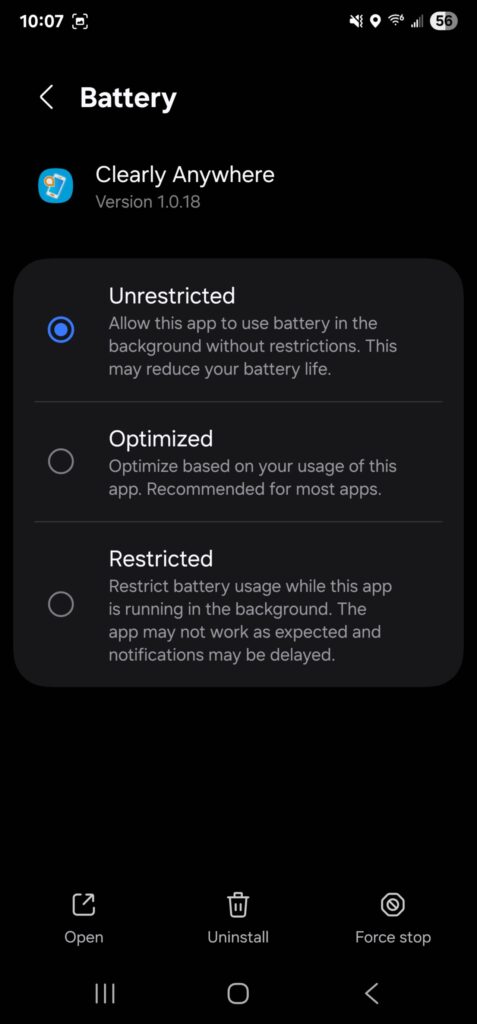
After this, set the battery settings to “Unrestricted”. Once this is done, the app will not shut down after you close it out.
Android App Setup #

  • Open the app and Scan QR Code. Your unique QR code was sent out when your account was activated and can also be accessed by going to your PBX.
  • Allow Notifications, Microphone, Phone and Contacts.
  • Allow Full Screen preview for incoming calls.
    • This step may vary depending on the brand of Android phone you have. If you have questions, please reach out to the helpdesk.
  • Make a call! That’s it. Your extension is now available for use on your Android Phone.

iPhone App Setup #

  • Open the app and Scan QR Code. Your unique QR code was sent out when your account was activated and can also be accessed by going to your PBX.
  • Allow Notifications, Microphone, and Contacts.
  • Make a call! That’s it. Your extension is now available for use on your iPhone.

Updated on October 7, 2025

What are your Feelings

  • Happy
  • Normal
  • Sad

Share This Article :

  • Facebook
  • X
  • LinkedIn
  • Pinterest
Yealink W73H Phone Cheat SheetYealink W73H Phone Cheat Sheet
Table of Contents
  • Download the Clearly Anywhere app:
  • Android Battery Settings
  • Android App Setup
  • iPhone App Setup

Copyright © 2026 - Crossley Media Group, LLC

Licensed by the NYS Department of State: 12000328720